
The counterparty look up is a function performed when using the central database of organisations.
The Counterparty Lookup feature appears in many parts of the software, including:
- Selecting a central counterparty when adding a creditor
- Selecting a central counterparty when specifying the supplier or customer of an invoice
- Selecting a central stand alone counterparty
To select a counterparty as a creditor
To add a new creditor:
1. Open the new creditor form
From the creditor register select the creditor class and click "Add Creditor"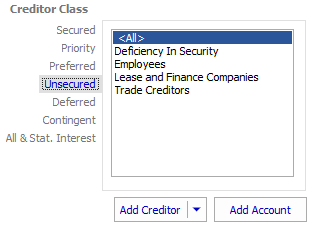
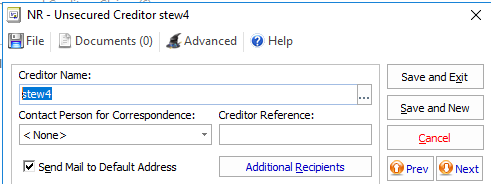
The new creditor form appears.
2. Select the Counterparty
In the "Creditor Name" field type the creditor's name and press Enter.
The Counterparty Search form appears.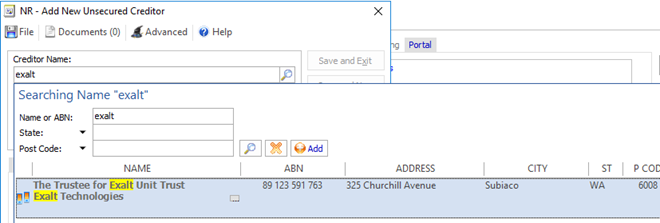
2a. Select the Counterparty
If a matching counterparty already exists in the database, the search results will return a list of possible matches in the search results.
Note: Counterparties that have an ABN entered and web registered counterparties will appear at the top of the list.
A creditor registered counterparty will appear with an asterisk.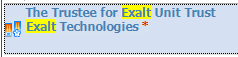
Double-click on the results to select the Counterparty.
The Counterparty has now been added to the Creditor.
2b.1. Add a new Counterparty
To add an new counterparty, click "Add" or press "Enter".
The Australian Business Register search lookup appears.
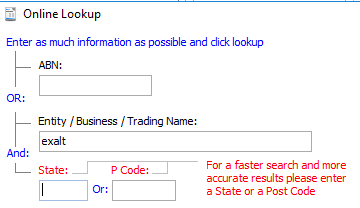
2b.2.
Enter any additional search criteria such as "State" and "Post Code" to narrow down the search criteria and press "Enter".
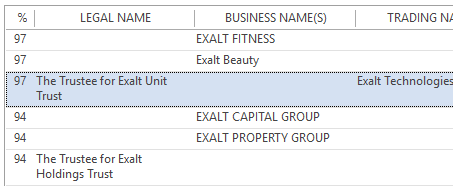
The software performs an ABN Lookup and returns the results. The search results provide a percentage match and further details to allow you to select the entity you're dealing with.
Double click on the results to select the Counterparty. The counterparty details are populated with the ABN number and any details that can be ascertained from the search such as the post code and state.
3. Add a Counterparty the old fashioned way
If you cannot find the counterparty through the ABN Lookup then you can add the counterparty using the New Counterparty form.
To add a new Counterparty click "Add New".
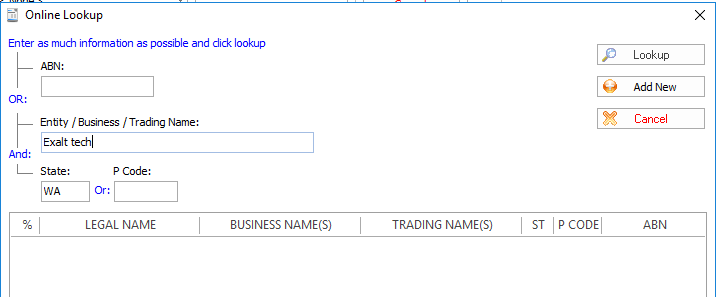
The Add New Counterparty form appears:

Enter the Counterparty details and click "Save".
Comments
0 comments
Please sign in to leave a comment.