
When you have finalised a PAYG Payment Summary for an employee for the year, the employee will report on the Amended PAYG Payment Summary. This is because you cannot provide an employee more than one payment summary each year.
A date lodged appears in on the Tax tab of the employee claim record when an employee has a lodged Payment Summary.
If you have inadvertently finalised the Payment Summary, but, not sent it to the employee, you may undo the lodgement by deleting the PDF output document from document management.
- Navigate to the Document tab.
- Search for 'PAYG. Entering a date or date range will narrow down the search. Click Search Now
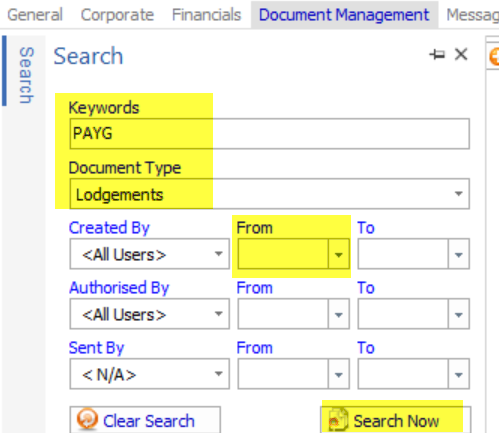
- Locate the PAYG Payment Summary lodgement record
- Delete the document record.
- You will undo all lodgements for all employees that are contained within the lodgement.
Comments
0 comments
Please sign in to leave a comment.