
Group deposits and Payments is the preferred method for realising assets where costs are involved in the sale of assets so the correct Payee and Payer names are recorded correctly on the Form 5602 and Form 5603.
Your entry will appear in the cashbook with the narration for the Payee as Grouped Receipt however in your statutory reports the receipt will report using the Customer Name under Receipts and the Payment will report using the Payee name under Payments.
You can process Group Deposit/Payments through Batching or through the Group Deposits and Payments account. If you do not have permission to enter Receipts and Payments directly you will need to use the Batching option.
Entering grouped deposits and payments through a batch
To enter a Grouped Deposit:
- Navigate to the Transactions > Pay-in Slips register
- Click "New Batch"
- Enter the batch name
- Click "OK"
You have created a new batch.
Enter the transaction:
- Click on Group a Receipt with a Payment
- Click on Receipts > "New Cash Sale / Asset Realisation"
- Click on the "Asset Realisation" tab
- Enter the Customer Name (purchaser of the asset)
- Use the drop down to select the asset to be realised
- Enter the Asset Realisation details
- Save and Exit
Note: If you raised an invoice (Credit Sale/Asset Realisation) for the sale of the asset you would select Receive Debtor Payment from the Receipts drop down list.
Next enter the Grouped Payments relating to the sale of the Asset.
1. Click on Payments > Make Payment
2. Enter payments that relate to the sale of the asset. Allocate the expense(s) to the asset as shown in the screen shot
3. SAVE and EXIT
Note: If you are including an Account Payable entry select Make Supplier Payment from the Payments drop down list. The Account Payable should be allocated to the asset when preparing the Account Payable transaction. If you do not allocate the account payable it will not be included in the total costs associated with realising the asset in the Asset Capture page.
Your group Receipt will now look like this. Net receipt will equal the value of your cheque to bank or EFT received.
SAVE and EXIT again
If you are using Electronic Approval select Submit Batch for Approval for the transaction to be approved and posted to your Cash at Bank account.
If the secured creditor has been paid directly you can create the payment using the account Secured Creditor (Fixed): Claims or Secured Creditor (Floating): Claims. Allocate the payment to the secured creditor.
EG
Entering via Group Deposits and Payments account
Enter into the job
Click on FINANCIALS->ACCOUNTS. Double click to open GROUP DEPOSITS AND PAYMENTS
Click on NEW CASH SALE/ASSET REALISATION
Enter receipt details.
NB the Asset sale amount is the GROSS amount of the sale, before payments have been deducted.
If this is a part payment make sure PART SALE is ticked. Leave unticked if this is the full realisation value.
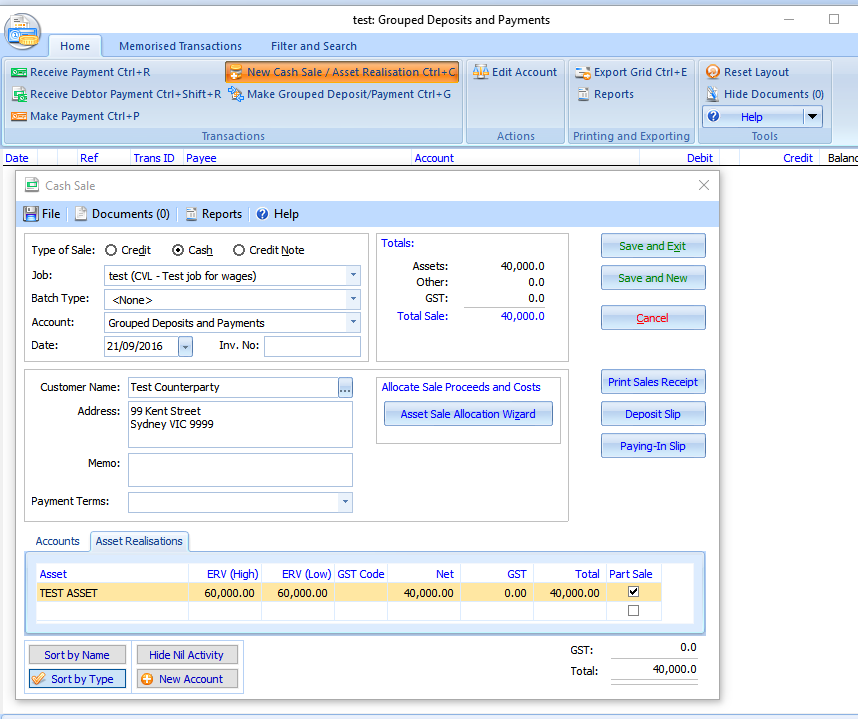
SAVE AND EXIT
Now prepare the payment side of the transaction by selecting MAKE PAYMENT from the Group Deposits and Payments screen.
Enter the payment details and allocate the payment to the asset being sold.
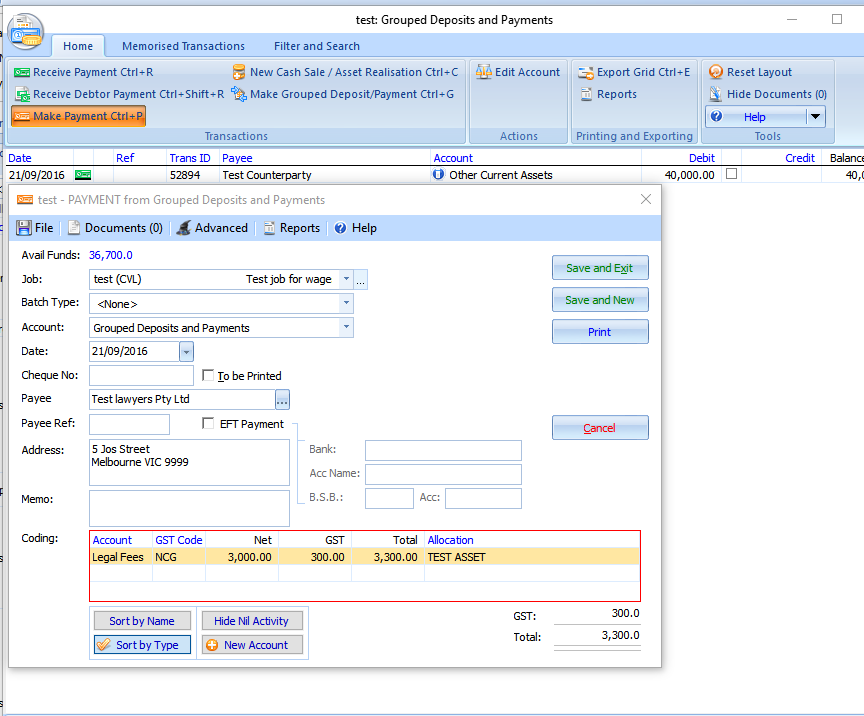
Repeat for each payment made as part of the transaction.
Deposit funds into the Cash at Bank account:
From Financials > Accounts double click on Grouped Deposits and Payments
Select MAKE GROUPED DEPOSITS/PAYMENT
Click ALL to show receipts and payments. Tick receipts and payments relating to the asset being realised.
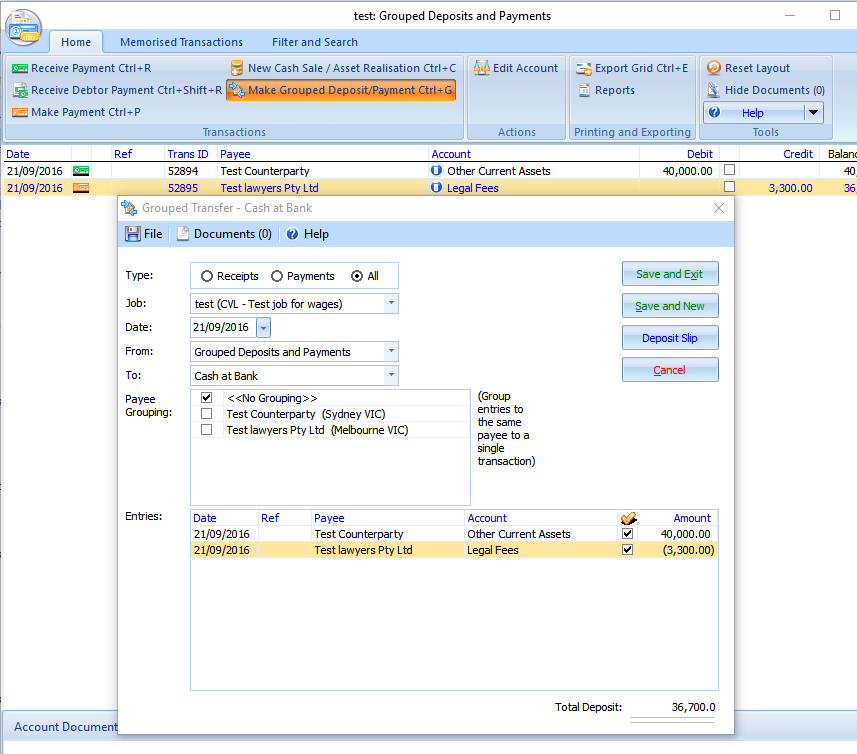
SAVE and EXIT
The net receipt will be the total of the funds received to bank.
Your entry will appear in the cashbook with the narration Transfer however in your statutory reports the receipt will report using the Customer Name under Receipts and the Payment will report using the Payee name under Payments.
Note: The is no option for approving the transaction using this method. If you are using the approvals function you will need to use the first option and create a batch.
REALISING ASSETS WHERE THE SECURED CREDITOR HAS BEEN PAID THE BALANCE OF FUNDS DIRECTLY.
This results in a nil balance transaction.
Enter the payment to the secured creditor as per below example
Your group deposit will be nil. You can leave the transactions in Grouped Deposits and Payments account.
On your Form 5602 your asset will report as part of the gross realisations to date and the payment as a Distribution to secured creditors. The receipt and payment will also appear in your summary of receipts and payments.
Comments
0 comments
Please sign in to leave a comment.