
This is required to hold the various resource files for the application (merge templates and document management). This is then mapped to a local directory.
Open 'Storage accounts' from the 'hamburger' portal menu (top left) (or Azure services from the home page).
Click '+ Create'.
In the 'Basics' panel, add the following details:
Resource Group: {should autocomplete if the resource group has already been created}
Storage a/c name: e.g., '<client name>insolvency (lower case letters and numbers only)
Location: (Asia Pacific) Australia Southeast
Performance: Standard
Redundancy: Read-access geo-redundant storage (RA-GRS)
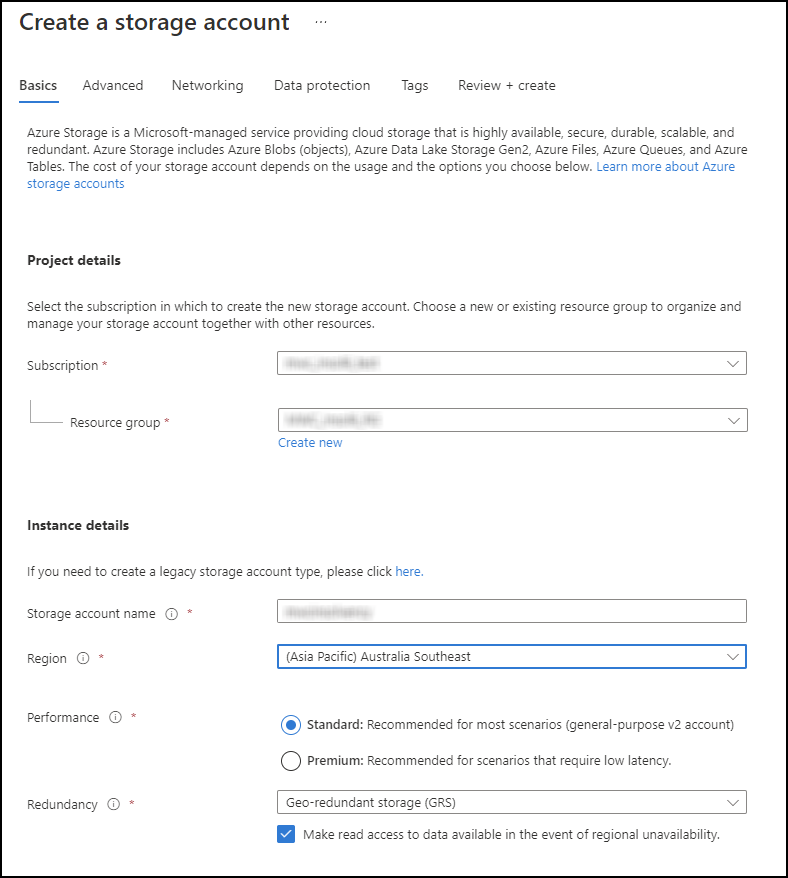
The other pages may be left with their default values.
Click 'Review and create'. Azure then validates the selection, which may take some time.
Click 'Create' once the validation has finished.
Click 'Go to resource' once deployment has finished.
NOTES:
- It used to be necessary to create a 'blob' storage account but this appears to be no longer to be the case. The storage account created should allow for 'blob public access' (from the 'properties' page of the storage account).
- The 'Subscription' field should be pre-completed with details from the subscription.
- The resource group and storage account name must include the name of the client.
- The location should be set to 'Australia Southeast' region for all AU clients.
Comments
0 comments
Please sign in to leave a comment.